
Error Graph
This is one of the basic graphs and frequently use to debug the performance bottleneck. The error graph provides details about the type of errors and the time when they occurred. Error graphs could be…
This is one of the basic graphs and frequently use to debug the performance bottleneck. The error graph provides details about the type of errors and the time when they occurred. Error graphs could be…

This has been noticed that the throughput graph is always less attentive. The reason could be that a performance tester does not understand its importance or does not care about it because it is not…

In a performance test script, a transaction refers to a group of requests which are sent to the server. A simple webpage may contain multiple requests which are associated with the components available on it.…

Response time graph gives a clear picture of overall time including requesting a page, processing the data and getting the response back to the client. As per PTLC (Performance Test Life Cycle), the Response time…
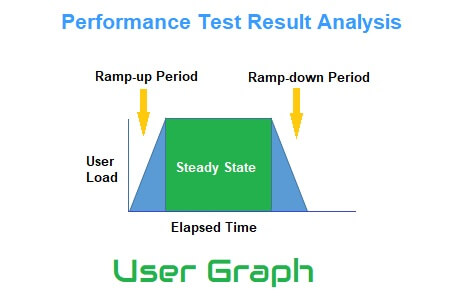
A User Graph provides complete information about the load patterns during the test. This graph helps to identify: In the runtime viewer, User Graph provides information about the number of users currently accessing the application. When…

Client-side performance test statistics represent the behaviour of the application which an end-user may experience in the real world. The analysis of such stats and graphs is termed Client-side Result Analysis. As an outcome of…