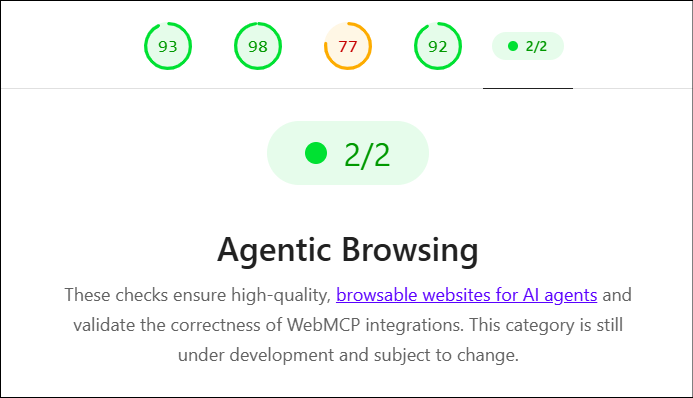
For years, web engineers have used Google Lighthouse to answer questions such as:
- Is my website fast?
- Is it accessible?
- Does it follow modern web-development practices?
- Is it optimized for search engines?
Now there is a new question:
Can an AI agent reliably understand and interact with my website?
This is the idea behind Lighthouse’s new Agentic Browsing category.
The rise of AI agents is changing how users interact with websites. Instead of a person manually opening a website, finding a product, filling out a form, and clicking buttons, an AI agent may eventually perform these tasks on the user’s behalf.
For example:
“Find me a hotel in Mumbai for three nights, select the best option under ₹10,000 per night, and start the booking.”
An AI agent needs to understand the page, identify the correct controls, enter information, and interact with the application reliably. That creates a new type of engineering problem.
A website can be:
Fast + accessible + SEO-friendly
and still be difficult for an AI agent to operate.
Lighthouse’s Agentic Browsing category is designed to provide deterministic technical signals for this new problem. Google currently describes the category and WebMCP support as experimental, based on proposed standards. The current implementation requires Chrome 150 or later, and WebMCP audits require the WebMCP origin trial.
For a Performance Tester or Performance Engineer, this is particularly interesting because agent reliability is strongly connected to traditional performance concepts such as layout stability, DOM behavior, rendering, timing, and reproducibility.
What Is Agentic Browsing?
Let’s start with the simplest definition.
Traditional browsing
A human visits:
Website
   ↓
Looks at the screen
   ↓
Finds button
   ↓
Clicks button
   ↓
Reads result
   ↓
Continues
Humans are very good at interpreting visual information. If a button says “Continue”, human can usually understand what it means from the surrounding page. We might also understand:
- icons
- colors
- position
- headings
- nearby text
- visual grouping
An AI agent does not necessarily experience the page in exactly the same way. It needs machine-readable signals that tell it what things are and what they do.
Agentic browsing
An AI agent might perform:
Understand page
      ↓
Identify available actions
      ↓
Understand required inputs
      ↓
Choose an action
      ↓
Execute action
      ↓
Verify result
      ↓
Continue
The important difference is that the agent isn’t simply reading your website. It is trying to operate it. Google describes this shift as the web moving from agents that primarily search the web toward agents that can actually use the web.
Why Does Lighthouse Need an Agentic Browsing Category?
Lighthouse already has several categories.
The familiar ones include:
- Performance
- Accessibility
- Best Practices
- SEO
Lighthouse generates audits against a web page and reports areas that need improvement. But imagine this website:
<button>Continue</button>A human can probably understand it. But now imagine:
<button aria-label="Continue to passenger details">
    Continue
</button>
The second version gives a machine more useful information. Now consider a more serious problem. Suppose an agent identifies a button at:
X = 850
Y = 600
The agent is about to click it. Then an advertisement loads. The page moves. The button is now at:
X = 850
Y = 750
The agent may click the wrong thing. For a human, this might be mildly annoying. For an automated agent, it can cause the entire task to fail. This is where performance engineering and agentic readiness start overlapping.
What Does Lighthouse Agentic Browsing Actually Check?
The current Agentic Browsing category focuses on several important signals.
The major areas include:
- Agent-centric accessibility
- WebMCP integration
- Layout stability / CLS
llms.txtdiscoverability
Google describes these as deterministic signals intended to make agent-readiness measurable and actionable. Let’s understand each one.
1. Agent-Centric Accessibility
This is probably the easiest concept to understand. An AI agent needs to understand:
“What is this element?”
For example:
<button>Buy</button>The agent may understand that this is a button. But what exactly does “Buy” mean? To buy
- the current product?
- a subscription?
- a ticket?
- an upgrade?
- something else?
A better implementation might expose clearer semantics through the accessibility tree.
For example:
<button aria-label="Buy Premium Plan">
    Buy
</button>
Now the machine-readable representation contains more context.
What is the accessibility tree?
You may already know about the DOM (Refer to UI Performance Testing Complete Course). The DOM is essentially the browser’s representation of the HTML structure.
For example:
HTML
 ├── Header
 ├── Navigation
 ├── Main
 │    ├── Heading
 │    ├── Product
 │    │    ├── Image
 │    │    ├── Price
 │    │    └── Button
 └── Footer
The browser also creates an accessibility tree. Assistive technologies such as screen readers use this tree. AI agents can also use accessibility information to understand interactive elements. Google specifically notes that agents rely on the accessibility tree as an important data model for understanding pages.
Why Should a Performance Tester Care About Accessibility?
At first this sounds like someone else’s responsibility. A performance engineer might think:
“Accessibility belongs to the accessibility team.”
But Agentic Browsing creates an interesting connection. A poor accessibility tree can make an agent unable to identify or interact with an element. And the accessibility tree is affected by things such as:
- DOM complexity
- dynamically generated content
- visibility
- element roles
- labels
- application state
Google’s Agentic Browsing documentation specifically calls out programmatic names, valid roles and relationships, and visibility in the accessibility tree. Therefore, during testing, you should not only ask:
“Did the page load?”
Also ask:
“Can a machine understand what loaded?”
2. WebMCP: Giving AI Agents Explicit Tools
This is one of the most interesting parts of Agentic Browsing. Imagine an e-commerce website. A human sees:
Product
₹2,999

[Add to Cart]
An AI agent might need to understand:
Action: add_to_cart

Parameters:
    product_id
    quantity
This is where WebMCP comes in. WebMCP is a proposed standard for exposing website capabilities as tools that AI agents can use. Instead of forcing an agent to guess how your UI works, the website can explicitly expose functionality. For example:
Tool: add_to_cart

Description:
Adds a product to the user's shopping cart.

Parameters:
product_id
quantity
Google’s current Lighthouse audits can inspect WebMCP tools registered through declarative and imperative APIs.
Declarative vs Imperative WebMCP
There are two approaches you may encounter.
Declarative
The capability is described directly in HTML. Conceptually:
<form
    toolname="book_appointment"
    tooldescription="Book an appointment for the selected doctor">
The browser can discover the tool from the page structure.
Imperative
JavaScript registers the tool. Conceptually:
document.modelContext.registerTool(...)This approach is useful when tools need to be created dynamically. Lighthouse monitors WebMCP tool registration through the Chrome DevTools Protocol and can inspect both declarative and imperative registration.
Why WebMCP Matters to Test Engineers
Think about WebMCP as another interface to your application. Traditionally, we test:
Browser UI
    ↓
Frontend
    ↓
API
    ↓
Backend
    ↓
Database
With agentic applications, there can be another interaction path:
AI Agent
    ↓
WebMCP / UI
    ↓
Frontend
    ↓
API
    ↓
Backend
This creates new test questions. For example:
- Is the tool registered?
- Is the tool description accurate?
- Are parameters correctly defined?
- Are required parameters actually required?
- Does the tool execute successfully?
- What happens when invalid input is supplied?
- How long does the operation take?
- Does the page remain stable after execution?
- Does the result become available in a predictable way?
This is where functional testing, performance testing, accessibility testing, and AI-agent testing begin to intersect.
WebMCP Schema Validity
Lighthouse also checks whether the WebMCP schema is correctly defined. For example, a tool should have both:
toolname
tooldescription
A required input should have a name. Optional fields should also provide enough context through labels or parameter descriptions. Google’s current schema audit reports failures for cases such as:
tooldescriptionwithouttoolnametoolnamewithouttooldescription- required form fields without
name
It can also warn when optional fields have a name but lack a parameter description or associated label. For a tester, think of this as contract validation. You are checking whether the machine-facing interface is properly defined.
3. Layout Stability: The Performance Engineer’s Connection
Now we reach an area that performance engineers already know very well:
Cumulative Layout Shift — CLS
CLS measures unexpected movement of page content. (Refer to UI Performance Testing Complete Course)
Consider this sequence:
Page loads

[Buy Now]
Then an image loads above the button:
[Product Image]

[Buy Now]
The button moved. For a human:
“That’s annoying.”
For an AI agent:
“The element I identified is no longer where I expected it to be.”
This can cause:
Agent identifies button
        ↓
Page shifts
        ↓
Agent interacts
        ↓
Wrong element
        ↓
Task failure
Google specifically identifies CLS as an important stability signal for agent interaction.
Why CLS Is More Important in an Agentic World
Traditional performance thinking often asks:
“Does layout shift hurt the user experience?”
Agentic testing adds another question:
“Can layout movement cause an automation failure?”
Suppose an agent needs to click:
[Delete Account]But a popup appears immediately before the click. The button moves. The agent might interact with:
[Cancel]instead. This isn’t merely a performance issue. It becomes a reliability issue. Therefore:
Performance
     +
Stability
     +
Machine interaction
     =
Agent reliability
4. llms.txt
Another part of the current category is llms.txt. The basic idea is simple. A website can provide:
https://example.com/llms.txtcontaining a concise, machine-readable summary of the site’s purpose and important resources. Think of it as:
“Here is a quick guide to what this website contains and where the important information is.”
Google describes llms.txt as an emerging convention intended to help LLMs and AI agents understand a site’s high-level structure and content. For example:
# Example Store

Online electronics store.

## Important pages

- Products
- Categories
- Shipping
- Returns
- Support
The exact content should follow the relevant llms.txt convention rather than treating it as an arbitrary text file.
Is llms.txt Mandatory?
No. According to Google’s current Lighthouse documentation, if llms.txt isn’t provided and the server returns a 404, the audit is treated as Not Applicable (N/A) because providing the file is currently optional. So don’t interpret:
No llms.txtas:
Your website failed.Instead, understand the distinction between:
Not applicableand:
FailedThis distinction is particularly important when building automated quality gates.
Does Agentic Browsing Give a 0–100 Score?
This is another important difference from traditional Lighthouse categories. You may be accustomed to seeing:
Performance       92
Accessibility     98
Best Practices    100
SEO               95
Agentic Browsing currently works differently. Google says the category does not currently use the traditional weighted 0–100 Lighthouse score. Instead, the report provides things such as:
- Pass Ratio
- Pass Audits
- Not Applicable
The reason is that agentic-web standards are still evolving. So don’t create a test such as:
if AgenticBrowsingScore < 90:
    fail
without understanding what version of Lighthouse and which audits you are actually evaluating. At this stage, the individual audit results are more useful than pretending the category is a mature benchmark.
How Should a Performance Engineer Test This?
Let’s build a practical testing strategy.
Layer 1 — Baseline Lighthouse
First run your normal Lighthouse categories.
Check:
Performance
Accessibility
Best Practices
SEO
Then run:
Agentic BrowsingThe goal is not to replace existing performance testing. It is to add another dimension.
Layer 2 — Inspect the Accessibility Tree
Don’t stop at the visual UI. For important workflows, inspect whether the browser exposes useful machine-readable information. For example:
Login

Username
Password

[Sign in]
The agent should be able to determine:
Input → Username
Input → Password
Button → Sign in
rather than seeing a collection of anonymous controls. This is particularly important for:
- login
- checkout
- booking
- search
- payment
- account management
- forms
- navigation
Layer 3 — Test Layout Stability
For critical agent workflows, measure CLS and investigate unexpected movement. Look for common causes:
Images without dimensions
Bad:
<img src="product.jpg">Better:
<img
    src="product.jpg"
    width="600"
    height="400"
>
Dynamically inserted advertisements
Page
 ↓
Content
 ↓
Ad injected
 ↓
Content moves
Late-loading UI components
For example:
Page loads
 ↓
React component loads
 ↓
Banner appears
 ↓
Buttons move
Fonts
Font changes can also affect layout.
The general principle is:
Reserve space before content arrives.
Layer 4 — Test WebMCP Contracts
If your application exposes WebMCP tools, treat them like APIs. Create tests such as:
Tool exists?
      ↓
Correct name?
      ↓
Correct description?
      ↓
Required parameters?
      ↓
Correct parameter names?
      ↓
Correct parameter descriptions?
      ↓
Valid input?
      ↓
Invalid input?
      ↓
Expected response?
This is very similar to API contract testing.
Layer 5 — Test End-to-End Agentic Tasks
This is where things become particularly interesting. Don’t only test:
Button existsTest:
Can the complete task be completed?For example:
Booking application
Find doctor
   ↓
Select date
   ↓
Select time
   ↓
Enter patient information
   ↓
Confirm appointment
Measure:
- task success rate
- task completion time
- number of interactions
- failed interactions
- page shifts
- tool invocation failures
- incorrect element selection
- timeout rate
This is closer to real-world agent performance.
21. Agentic Browsing vs Traditional Performance Testing
A useful way to think about the difference is:
| Traditional Performance Testing | Agentic Readiness |
|---|---|
| How fast does the page load? | Can an agent understand the page? |
| How quickly does an API respond? | Can an agent invoke the correct capability? |
| Is the page visually stable? | Does stability prevent agent misinteraction? |
| Is the UI accessible? | Can a machine understand the controls? |
| Does JavaScript execute quickly? | Are tools registered in time? |
| Does the user complete the flow? | Can an agent complete the flow reliably? |
There is considerable overlap. Agentic Browsing isn’t replacing performance testing. It is adding another consumer of your website that is “THE AI AGENT”.